Saturday, June 17, 2017

Get Blu-ray to MKV with multiple subtitles and audio tracks keeping


Nowadays, a commercial Blu-ray disc always has different built-in subtitle tracks for custom form different countries.If you want to output with multiple audio and subtitle for better learning foreign language, you can choose MKV for the format of conversion, because MKV format is able to hold unlimited and any type of audio, video and subtitle streams. You can put a complete movie into a single file including various audio, video and subtitle streams as well preserving menus and chapter structure. You can find everything in a MKV file when coping and converting Blu-ray movie to MKV.


You can use ultimate to rip Blu-ray to MKV with multiple subtitles and audio tracks. As to playing MKV on PC after finishing Blu-ray backup, you can install MKV-compatible media players such as Dimo Video Converter Ultimate which can fully support MKV playback. Players like Media Player Classic and MplayerX are also great choices. External HDD media players like WDTV, Porpcorn Hour, and Seagate Free Agent can also realize MKV playback. If you are Mac user, please turn to Dimo Video Converter Ultimate for Mac 

Free Download Dimo Video Converter Ultimate (Win/Mac):

          

Other Download: 

How to backup Blu-ray to MKV with mutiple audio/subtitle tracks

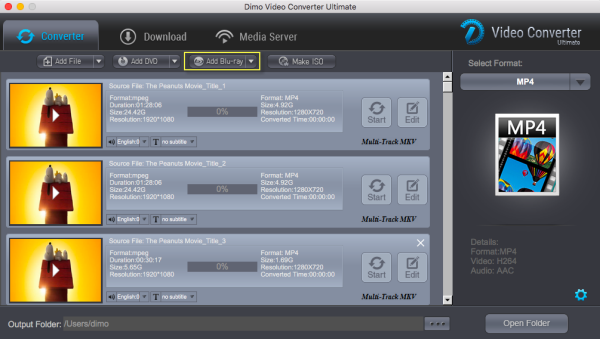
Step 1: Load Blu-ray movies

Insert the Blu-ray disc to the  drive and then click "Add Blu-ray" button to have Blu-ray movies uploaded to surface. You can also import DVD files for conversion.


Note: When importing a Blu-ray disc, please make sure that your PC has been equipped with an external or internal Blu-ray drive to recognize your Blu-ray disc.

Step 2: Choose multi-track output 

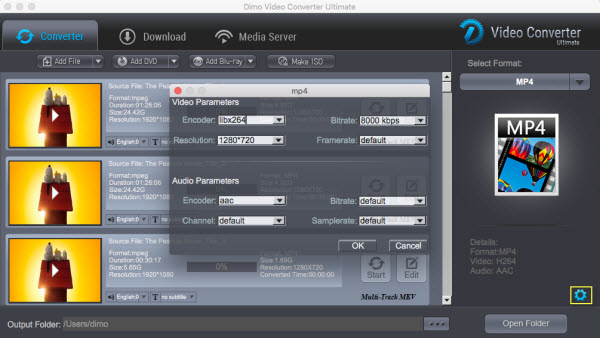
Click the "Audio" tab to check the audio channels you want and uncheck the unwanted. Click the "Subtitle" tab to check the subtitle language you want to keep and uncheck the unwanted ones. In addtion, click the "Multi-track MKV" where you can change video/audio/subtitle settings. And choose format "Common>video>MKV"to get the output video with multiple audio tracks and subtitles.


Step 3: Start converting Blu-ray to lossless MKV

Go back to the main surface and click "Start" to start conversion from Blu-ray to MKV with multiple audio tracks and subtitles preserved.

Tip: You can rip DVD with Multi Track and make Blu-ray copy without anything loss. Besides, you can convert videos to MP4, FIL, AVI, VOB,  WMV, iPad, iPhone, HTC, Samsung, etc.

Free Download or Purchase Dimo Video Converter Ultimate:


Need the lifetime version to work on 2-4 PCs so that your friends and family can instantly broaden their entertainment options? Please refer to the family license here


Kindly Note:

The price of Dimo Video Converter Ultimate for Windows is divided into 1 Year Subscription, Lifetime/Family/Business License: $43.95/Year; $45.95/lifetime license; $95.95/family license(2-4 PCs); $189.95/business pack(5-8 PCs). Get your needed one at purchase page.
Related Software:

BDmate (Win/Mac)

Lossless backup Blu-ray to MKV with all audio and subtitle tracks; Rip Blu-ray to multi-track MP4; ConvertBlu-ray to almost all popular video/audio formats and devices; Copy Blu-ray to ISO/M2TS; Share digitized Blu-ray wirelessly.

DVDmate (Win/Mac)

A professional DVD ripping and editing tool with strong ability to remove DVD protection, transcode DVD to any video and audio format, and edit DVD to create personal movie.

Videomate (Win/Mac)

An all-around video converter software program that enables you to convert various video and audio files to formats that are supported by most multimedia devices.

8K Player (Win/Mac)

A mixture of free HD/4K video player, music player, Blu-ray/DVD player, video recorder and gif maker. 

Contact us or leave a message at Facebook if you have any issues.

Related Articles:

Thursday, June 15, 2017

How to Copy Blu-ray Inside Out Beauty and Beast Easily & Correctly


Beauty and beast is an adaptation of the fairy tale about a monstrous-looking prince and a young woman who fall in love. The Blu-ray disc version was released in Mar 17, 2017. If you love this movie, now you can purchase the Blu-ray disc for collection. Instead of downloading movie Beauty and the Beast, you can also copy Beauty and the Beast Blu-ray disc to any device for watching. Read this article to learn how to rip and backup Blu-ray Beauty and Beast.


To finish this task, the Beauty and the Beast Blu-ray Ripper makes the whole thing as easy as a piece of cake. You can simply change some effects of the Beauty and the Beast to have the best effect with Dimo Video Converter Ultimate. If you are Mac user, you can turn to Dimo Video Converter Ultimate for Mac. It will help you to rip Beauty and the Beast Blu-ray to MKV, AVI, MP4, MOV, FLV, WMV, MPG or other any formats you want. 

Besides ripping Blu-ray disc movies, this software can also rip DVD file or convert HD Videos like MKV, AVI, WMV, MOV, MPG, MTS, M2TS, AVCHD, MXF, VOB, TiVo, etc. to editing programs, tablets, smartphones, HDTVs or any other formats. You can also download the video form the internet and share the located video with this software.

Free Download Dimo Video Converter Ultimate (Win/Mac):


Other Download: 

The following steps will tell you how to rip and backup Blu-ray Beauty and the Beast

Step 1: Download the top Beauty and the Beast Blu-ray Ripper, and then launch the program. Click "Add Blu-ray" to load Beauty and the Beast Blu-ray from Blu-ray drive.

Step 2: Choose the output format

This best Beauty and the Beast ripper has resets for different devices. Choose the needed format or device.


Other Options to backup Blu-ray:

- Option A: Make full Blu-ray copy without anything loss

Click "Select Format" bar, choose "Format" > "Multi-track" and choose lossless mkv to 1:1 copy Blu-ray. The backed up Blu-ray movie is usually saved as .mkv format with all audio channels preserving. And backup Blu-ray to custom multi-track mkv with optional audio track or subtitle is allowed.

Or you can click "Add Blu-ray > Copy Bluray Disc to Folder" or "Add Blu-ray > Copy Bluray Disc to ISO" to backup Blu-ray to BDMV folder or ISO files.

- Option B: Directly Copy Blu-ray to M2TS

Besides backup Blu-ray without quality lossless, Dimo Video Converter Ultimate for Mac also lets you copy Blu-ray to m2ts. Click "Direct Copy" after loading Blu-ray disc.

Tip 1: By clicking "Settings" icon, you can enter "Profile Settings" panel to adjust video size, bit rate, frame rate, sample rate and audio channels.

Tip 2: If the Blu-ray video clips are still longer than your requirements, then you could activate the build-in video editor in this Blu-ray video converter by click "Edit", so that you can choose to trim and split the Blu-ray movie into smaller parts with zero quality. Click the "Trim" icon in the main interface, and you can cut your files according to time length and file size.

Step 3: Click the "Start" button to convert the Beauty and the Beast Blu-ray movie and you will get it to play on multiple devices, such as iPad, iPhone, Samsung, HTC, Google, etc.

Free Download or Purchase Dimo Video Converter Ultimate:


Need the lifetime version to work on 2-4 PCs so that your friends and family can instantly broaden their entertainment options? Please refer to the family license here


Kindly Note:

The price of Dimo Video Converter Ultimate for Windows is divided into 1 Year Subscription, Lifetime/Family/Business License: $43.95/Year; $45.95/lifetime license; $95.95/family license(2-4 PCs); $189.95/business pack(5-8 PCs). Get your needed one at purchase page.

Related Software:

BDmate (Win/Mac)

Lossless backup Blu-ray to MKV with all audio and subtitle tracks; Rip Blu-ray to multi-track MP4; ConvertBlu-ray to almost all popular video/audio formats and devices; Copy Blu-ray to ISO/M2TS; Share digitized Blu-ray wirelessly.

DVDmate (Win/Mac)

A professional DVD ripping and editing tool with strong ability to remove DVD protection, transcode DVD to any video and audio format, and edit DVD to create personal movie.

Videomate (Win/Mac)

An all-around video converter software program that enables you to convert various video and audio files to formats that are supported by most multimedia devices.

8K Player (Win/Mac)

A mixture of free HD/4K video player, music player, Blu-ray/DVD player, video recorder and gif maker. 

Contact us or leave a message at Facebook if you have any issues.

Related Articles:

Monday, June 12, 2017

Fastest Way to Convert MPG to MP4 with Lossless Quality on Mac/Windows

The Moving Picture Experts Group's MPEG video file contains highly compressed video content and is used for online video distribution. But it is not compatible with a device such as iPhone, which can only playback MP4 (mpeg-4/ H.264/MPEG-4 AVC) , mov, m4v files. MP4 format is a format commonly used for sending video clips over the Internet and playable on most media players, including Microsoft Zune and the Apple iPod, QuickTime, iTunes.


If you want to convert MPEG/MPG to MP4, you can do easily with Dimo Video Converter Ultimate , which is a decent yet easy-to-use program with user-friendly interface that can convert MPG files to whichever format you want. If you are Mac user, please turn to Dimo Video Converter Ultimate for Mac. After converting MPEG/MPG to MP4 format, you can free up space on your hard drive and get the identical high quality of your video files with small size. By the way, this Mac encoder also works well if you have the need of encoding from MP4 to MPG/MPEG file on Mac. For Windows user, please try Video Converter for Windows here.

Free Download Dimo Video Converter Ultimate (Win/Mac):


Other Download: 

How to Convert MPG to MP4 on Windows or Mac

Step 1. Add MPG File

You can free download Dimo Video Converter Ultimate and install it. After the installation the software will launch automatically. On the interface you can click "Add Files" to open file browser to select the MPG videos you want to convert and confirm.


Step 2. Choose MP4 as Output Video Format

Making sure all files added, you can now click on the " Format" bar and select MP4 as the output format on the drop-down list.If you want to alter the output video's parameter in accordance with your interest, you can click "Edit" at the end of the video to crop or trim the video, and you can even add filter to make the video more special.


Step 3. Start Converting MPG to MP4

After all settings done, you can now click the "Start" button to start the conversion. The conversion will finish automatically in minutes. Therefore, you can choose to take a rest.

Tip: Dimo Video Converter Ultimate serves as an audio converter as well, you can also choose to convert WMA to MP3 with Video Converter Ultimate. In addition, you can rip Blu-ray/DVD disc to other format, such as, MP4, FLV, MOV,MKV etc. and you can convert rip Blu-ray/DVD disc to iPad, iPhone, HTC, Samsung and so on.

Free Download or Purchase Dimo Video Converter Ultimate:


Need the lifetime version to work on 2-4 PCs so that your friends and family can instantly broaden their entertainment options? Please refer to the family license here


Kindly Note:

The price of Dimo Video Converter Ultimate for Windows is divided into 1 Year Subscription, Lifetime/Family/Business License: $43.95/Year; $45.95/lifetime license; $95.95/family license(2-4 PCs); $189.95/business pack(5-8 PCs). Get your needed one at purchase page.

Related Software:

BDmate (Win/Mac)

Lossless backup Blu-ray to MKV with all audio and subtitle tracks; Rip Blu-ray to multi-track MP4; ConvertBlu-ray to almost all popular video/audio formats and devices; Copy Blu-ray to ISO/M2TS; Share digitized Blu-ray wirelessly.

DVDmate (Win/Mac)

A professional DVD ripping and editing tool with strong ability to remove DVD protection, transcode DVD to any video and audio format, and edit DVD to create personal movie.

Videomate (Win/Mac)

An all-around video converter software program that enables you to convert various video and audio files to formats that are supported by most multimedia devices.

8K Player (Win/Mac)

A mixture of free HD/4K video player, music player, Blu-ray/DVD player, video recorder and gif maker. 

Contact us or leave a message at Facebook if you have any issues.

Related Articles:

Thursday, June 8, 2017

Convert Panasonic GH5 4K to iMovie for Editing

Learn Panasonic GH5 4K to iMovie best workflow form this page.

Panasonic GH5 delivers the highest quality with 4K in mp4 or mov format. Whereas, if you import Panasonic GH5 4K videos into iMovie, users always encounter video and audio problems, as the H.264 codec from GH5 is efficient, but simply isn't designed for editing. In addition, although iMovie has boasted the capacity to handle with 4K files without much problem, it is extremely hardware intensive especially for working on a old computer. So, before transferring Panasonic GH5 4K files to iMovie, you'd better convert GH5 4K MP4/MOV to 1080p AIC for smooth editing.

Along with some help from a top 4K video converter like Dimo Video Converter Ultimate for Mac, it can be done quickly and easily. It is capable of converting Panasonic GH5 MP4/MOV to Prores, AIC, DNxHD, MOV/MPEG-2 for smoothly importing and editing in various non-linear editing systems (NLE), including iMovie 08/09/11, FCP 6/7/X, DaVinci Resolve 9/10/11/12, Avid Media Composer 5.5/6.0/6.5/7/8, Adobe Premiere Pro and more. 

If iMovie or other NLEs is hard to handle your 4K files, with this tool you can downscale 4K to 1080p effortlessly. Below is how. Just take a look at the brief guide below. 

Free Download Dimo Video Converter Ultimate for Mac/Win:


Other Download: 


Step 1: Load the Panasonic GH5 4K videos to the program 

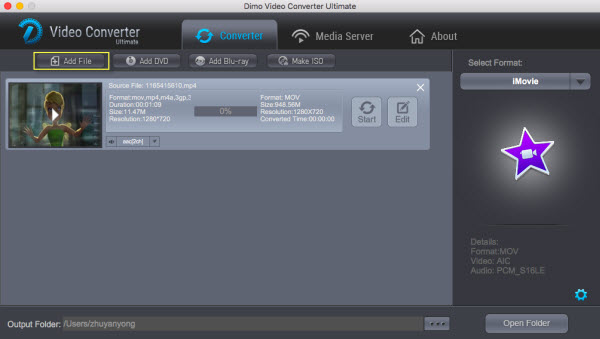
Download and install the 4K Video Converter, and then import the GH5 4K mp4 or mov files to it. To do so, you can directly drag & drop the files onto the main interface, or you can click the "Add File" icon to locate the videos from your local disk. 


Step 2: Set output video format 

Click the Format column to select output format "Editor> Moive" as the best compatible video format for editing 4K in iMovie. 

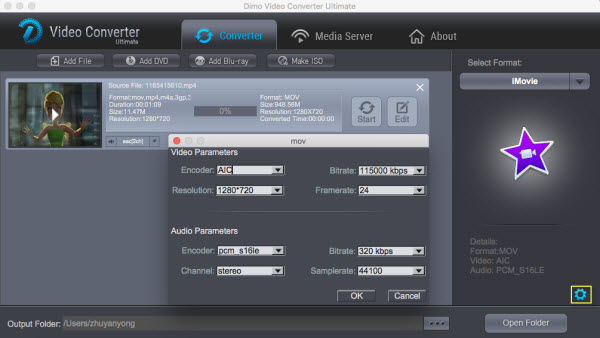
Tips: Hit the Settings icon, start to adjust the video and audio parameters, including the Bitrate of Video & Audio, Video Size, Sample Rate, Frame Rate, Audio Channels, etc. 


Step 3: Begin to convert Panasonic GH5 4K videos to iMovie 

Hit Start button to get 4K to iMovie conversion. Once it finished, you can click Start to get the output files. Now it would be an easy task to import and work Panasonic GH5 4K footage in iMovie 08, 09, 11, iMovie HD on Mac(macOS Sierra included). 


Free Download or Purchase Dimo Video Converter Ultimate for Mac/Win:


Need the lifetime version to work on 2-4 Macs so that your friends and family can instantly broaden their entertainment options? Please refer to the family license here


Kindly Note:
The price of Dimo Video Converter Ultimate for Mac is divided into 1 Year Subscription, Lifetime/Family/Business License: $43.95/Year; $45.95/lifetime license; $95.95/family license(2-4 Macs); $189.95/business pack(5-8 Macs). Get your needed one at purchase page.

Related Software:

BDmate (Mac/Win)

Lossless backup Blu-ray to MKV with all audio and subtitle tracks; Rip Blu-ray to multi-track MP4; Convert Blu-ray to almost all popular video/audio formats and devices; Copy Blu-ray to ISO/M2TS; Share digitized Blu-ray wirelessly.

DVDmate (Mac/Win)

A professional DVD ripping and editing tool with strong ability to remove DVD protection, transcode DVD to any video and audio format, and edit DVD to create personal movie.

Videomate (Mac/Win)

An all-around video converter software program that enables you to convert various video and audio files to formats that are supported by most multimedia devices.

8K Player (Mac/Win)

A mixture of free HD/4K video player, music player, Blu-ray/DVD player, video recorder and gif maker. 

Contact us or leave a message at Facebook if you have any issues.

Related Articles:

  • Convert G2M WMV recordings from GoToMeeting for playing/sharing
  • How to rip and play DVD on HTC U11
  • Converting videos to LG G6 compatible video formats
  • [/list]

    Thursday, June 1, 2017

    Free Download Full HD Detective Conan Movie Torrent

    Detective Conan serialized for more than a decade, accompanied by many people's childhood. On the day of Children's Day, it's great to review or see the lastest Detective Conan movie---Detective Conan: Crimson Love Letter with your family.
    Detective Conan: Crimson Love Letter (名探偵コナン から紅の恋歌? Meitantei Konan: Kara Kurenai no Rabu Retta) is an upcoming Japanese animated film directed by Kobun Shizuno and written by Takahiro Okura. It will be the twenty-first installment of the Case Closed film series based on the manga series of the same name by Gosho Aoyama, following the 2016 film Detective Conan: The Darkest Nightmare.  Also if you like, you can download them through the free movie downloader - Dimo Video Converter Ultimate for Mac to have full-length animated movies for your kids to watch on your iPad, iPhone, Android etc. without bandwidth limitation.
    With it, you can also do batch conversion from any video to MP4, AVI, FLV, WMV, MKV, H.265, etc. video files on Mac (OS Sierra) with fast encoding speed and high output quality. It lets you enjoy the thrill of video/audio conversion between various formats. What you can achieve from this onverter doesn't limit in here. Its built-in editor allows you to adjust the video effects for better visual enjoyment. Apart from that, it can also make ISO from any videos for backup without compressing any image quality. Moreover, you can download online videos from 300+ popular sites like YouTube, BBC, Vimeo, Facebook, etc.  If you are the user of Windows computer, simply turn to Dimo Video Converter Ultimate to convert videos for using on Win.
    Free Download Dimo Video Converter Ultimate for Mac/Win:
             
    Other Download:
    Free Download Detective Conan: Crimson Love Letter Movie to iPhone iPad Android
    Step 1: Paste Movie URL
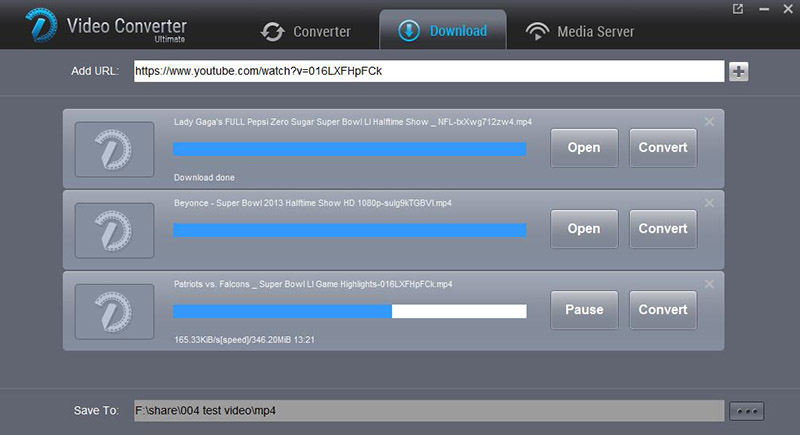
    Free download and launch the movie downloader. Click "Download" icon and Ctrl/Command + V" to paste the Detective Conan movie URL.
    Step 2: Start downloading Detective Conan movie
    Click the "Browse" button and choose the location where you would like to save your output file. Then click "+" by the end of the address bar to begin to download Detective Conan movie free from online movie sites. Once this movie, trailer or soundtrack in 720p/1080p MP4, 3GP, MKV, MP3 are downloaded, click "Open" to locate the downloaded movie to watch on computer;
    Step 3: Choose the video format or device for converting to (Optional)
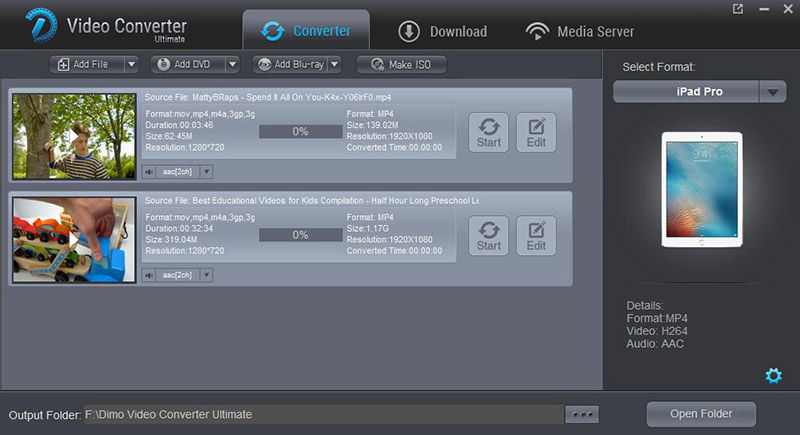
    Here you are at your disposal to click "Convert" and turn to "Converter" interface where you can choose the output format for Detective Conan movie conversion. For instance, if you'd like to play Detective Conan movie on iPad iPhone Android, just pick up the device model from "Device". Then click "Start" to convert downloaded Detective Conan to your target format and device. Likewise, these 3 simple steps are suitable for Detective Conan movie trailer download and Detective Conan soundtrack download.
    Free Download or Purchase Dimo Video Converter Ultimate for Mac/Win:
             
    Need the lifetime version to work on 2-4 Macs so that your friends and family can instantly broaden their entertainment options? Please refer to the family license here.

    Kindly Note:
    The price of Dimo Video Converter Ultimate for Mac is divided into 1 Year Subscription, Lifetime/Family/Business License: $43.95/Year; $45.95/lifetime license; $95.95/family license(2-4 Macs); $189.95/business pack(5-8 Macs). Get your needed one at purchase page.
    Contact us or leave a message at Facebook if you have any issues.
    Related Articles:

    source:

  • Free Download Full HD Detective Conan Movie Torrent
  • Thursday, May 25, 2017

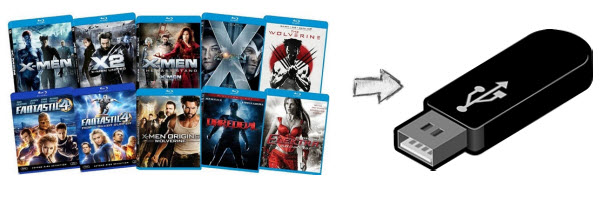
    The Way to Copy Blu-ray to USB Drive With Ease

    USB flash drives have amazing ability to store large amounts of data, ranging from 8MB to 1TB of storage capacity. It is easy to carry, do not worry about scratches. In some cases, you want to back up your Blu-ray content to a USB flash drive for easy playback or management. It is no doubt useful and helpful if you are tired of borrowing Blu-ray discs from friends. However, Blu-ray copy protection is more complex than any other format, and is usually large in size. Therefore, to copy a Blu-ray disc to a USB flash drive, you need to find a Blu-ray copying and ripping program that will help you to backup and tear/compress Blu-ray to a digital video file for storing on USB and play on usb connected devices.


    Nothing Lost! Rip/Copy Blu-ray to USB Thumbdrive with 1:1 Video and Audio Quality

    To backup Blu-ray to USB drive, Dimo Video Converter Ultimate for Mac is one in a million, letting you rip and copy DVD to USB drive in a manner that is lossless, fast and pain free:

    It's a high-end Blu-ray ripper for ripping Blu-rays to movies with 1-metre long list of output formats like MP4, AVI, MPG, MOV, FLV, WMV, MKV, H.265, 3D, etc. and more for transferring to USB Flash Drives, no matter what type of Blu-ray disc you hold. It can do all types of ripping at the super-fast speed and use less memory without you having to worry about loss of original quality. This easy to use tool is not only a wonderful program to rip Blu-ray to digital formats for USB Drive, but also to copy Blu-ray to m2ts, ISO, lossless mkv, multi-track MP4, etc and even backup the whole content of Blu-ray to BDMV folder without losing any data. 

    The copying process and conversion will allow you to play and share videos on your HDTV, tablet, laptop and more. Plus, you are allowed to custom video bitrate, frame rate to compress the videos to a format that is USB/computer/device-friendly. If you are the user of Windows computer, simply turn to Dimo Video Converter Ultimate to convert and transfer Blu-ray videos to USB on Windows PC.

    Free Download Dimo Video Converter Ultimate for Mac/Win:


    Other Download: 
    How to copy a Blu-ray from PC/Mac to USB Flash Drive

    Step 1. Load Blu-ray Movie

    Launch the best Blu-ray copy program and insert Blu-ray Disc to your Blu-ray disc drive to read Blu-ray Disc.

    Tip: You are able to select the main title and set subtitles/audio language you'd like to preserve.


    Step 2 Select output format

    In this step, you need to choose the format for the output file as well as the destination folder. Usually, flash drive will accept any kind of video format. But you need to make sure the format you choose can be played well on the devices that you used to open them. 

    Also, the format used for copying files to a flash drive will depend largely on the storage capacity of the drive.Many feature-length video files can be compressed easily to AVI or MP4 to fit on the regular 1GB flash drive. Unlike the AVI, the MP4 are smaller and more compressed files which might be more helpful for storing on the smaller size flash drives. So, basically the "Format > Video" > "MP4 Video" is an universal format for almost all multimedia devices. Of course, you can choose WMV, MOV, AVI, etc. according to your needs.

    Meanwhile, the program provides the optimized preset formats for almost all popular multimedia devices and HD media players including iPhone, iPad , Samsung Galaxy Tab, Galaxy S7 Edge/S7, Gear VR, Oculus Rift, HTC Vive, PS Vita, PS3, PS4, Xbox 360, Xbox One, Samsung/LG/Sony/Panasonic TV, and more. Decide an output format you want.

    Other Options to backup Blu-ray:

    - Option A: Make full Blu-ray copy without anything loss

    Click "Select Format" bar, choose "Format" > "Multi-track" and choose lossless mkv to 1:1 copy Blu-ray. The backed up Blu-ray movie is usually saved as .mkv format with all audio channels preserving. And backup Blu-ray to custom multi-track mkv with optional audio track or subtitle is allowed.

    Or you can click "Add Blu-ray > Copy Bluray Disc to Folder" or "Add Blu-ray > Copy Bluray Disc to ISO" to backup Blu-ray to BDMV folder or ISO files.

    - Option B: Directly Copy Blu-ray to M2TS

    Besides backup Blu-ray without quality lossless, Dimo Video Converter Ultimate for Mac also lets you copy Blu-ray to m2ts. Click "Direct Copy" after loading Blu-ray disc.

    Tip 1: By clicking "Settings" icon, you can enter "Profile Settings" panel to adjust video size, bit rate, frame rate, sample rate and audio channels.


    Tip 2: If the Blu-ray video clips are still longer than your requirements, then you could activate the build-in video editor in this Blu-ray video converter by click "Edit", so that you can choose to trim and split the Blu-ray movie into smaller parts with zero quality. Click the "Trim" icon in the main interface, and you can cut your files according to time length and file size.

    Step 3 Start the Blu-ray to USB conversion

    Once everything is okay, you can press the Start button on the Blu-ray to flash drive converter to complete the process of backing up Blu-ray to USB in any format you wish. The Blu-ray movie conversion could take a few minutes or maybe thirty minutes, as it will depend on your computer's processor speed and RAM; how quick the Blu-ray drive read the file and the USB version. After that, you can use the files on flash drive in any that you want!

    And Dimo Video Converter Ultimate for Mac, is also helpful in wireless video transferring to portable devices or TVs via media server. After converting, you can freely get rip of USB or Flash drive or even unfriendly iTunes to copy the videos from your PC or Mac to any playback devices such as iPhone, iPad, TV, etc., as long as you keep your computer and target devices at the same network.

    Free Download or Purchase Dimo Video Converter Ultimate for Mac/Win:


    Big news! Dimosoft hold the biggest Mother's day promotion you have never met as below. You can enjoy the big discount before May 28th, you will not miss it! you will not miss it!


    Promotion Plan A:

    During May 14th to May 28th, all users can get Mother's day Gift Pack of bundle production with saving up to $105.

    Promotion Plan B: (For all Facebok users)

    During May 14th to May 28th, all Facebook users can enjoy a big discount of the strongest tool --- two all-in-one gift pack - 8K Player + BDmate + DVDmate and 8K Player + Video Converter Ultimate with saving up to &114!

    More than money saving, you can express ardent love to you Mother this time! Hurry up! What are you waiting for!

    Need the lifetime version to work on 2-4 Macs so that your friends and family can instantly broaden their entertainment options? Please refer to the family license here.


    Kindly Note:

    The price of Dimo Video Converter Ultimate for Mac is divided into 1 Year Subscription, Lifetime/Family/Business License: $43.95/Year; $45.95/lifetime license; $95.95/family license(2-4 Macs); $189.95/business pack(5-8 Macs). Get your needed one at purchase page.

    Contact us or leave a message at Facebook if you have any issues.

    Related Articles: